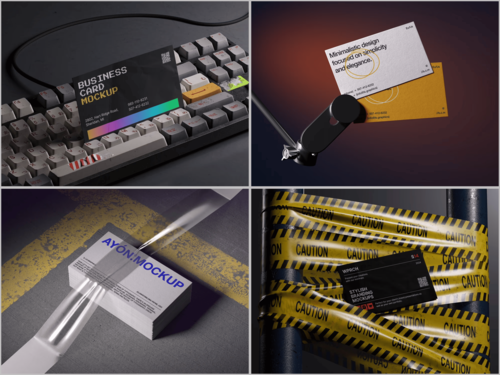
3D Rendering of Business Card Mockups: Why Flat Templates Are Becoming a Thing of the Past
A flat business card template is just a photograph or a vector layout placed on a background. A 3D-rendered mockup is something else entirely: a built scene, calculated pixel by pixel through ray tracing, where every shadow, reflection, and material response is simulated rather than captured. That distinction is why rendering, not photography, has quietly taken over how designers present print work.
Building the Scene, Not Photographing It
In a traditional mockup, someone printed a card, laid it on a desk, and shot it with a camera. Every color variation meant reprinting and reshooting. A 3D scene works differently — a designer builds a polygon mesh of the card, assigns it real-world dimensions, and places it inside a virtual environment with light sources and a simulated camera. Engines like Blender’s Cycles, Redshift, or V-Ray calculate how photons bounce between surfaces, producing shadows and reflections that behave like physics rather than guesswork. Once that scene exists, swapping artwork is a matter of replacing a texture map, not restaging a photoshoot.
This is exactly what makes a good Business card mockup file valuable to designers who don’t touch 3D software themselves — the ray-traced lighting and camera setup are already computed and baked into a smart-object template, so applying a logo through Photoshop still yields a physically accurate result.
What the Render Engine Actually Calculates
The realism of a 3D mockup comes down to a handful of technical layers working together:
- PBR materials — physically based rendering assigns roughness, reflectivity, and specularity values to each surface, so matte cardstock scatters light differently than a glossy laminate or a metallic foil stamp.
- Displacement and bump maps — letterpress indentation or embossed logos are simulated as actual height data, so light rakes across the surface and casts micro-shadows instead of relying on a flat texture trick.
- Subsurface scattering — thicker, uncoated paper stocks let a small amount of light pass through and scatter beneath the surface, which is why premium renders of cotton or recycled cardstock look tactile rather than plastic.
- Global illumination — light bouncing off a desk or wall onto the card itself, adding subtle color bleed that a flat template can never reproduce.
Real-World Applications Driving the Shift
This isn’t a purely aesthetic upgrade — it changes production workflows across the industry.
Print vendor configurators. Companies such as Moo and Vistaprint use rendered previews on their ordering pages so a customer can see how foil stamping or a rounded corner will actually catch light before paying for a print run.
Branding agency pitch decks. Agencies building a full identity system construct one 3D scene and reuse the same lighting and material setup across business cards, letterheads, and packaging, keeping the visual logic consistent across every asset in the presentation.
Freelance portfolios. Designers on Behance and Dribbble increasingly post rendered scenes instead of flat exports, since portfolio viewers engage more with images that resemble a finished product photograph rather than an unfinished design file.
Print shop quality control. Some small print studios render a proof before running a physical batch, catching foil or embossing issues at the digital stage rather than discovering them after paper and ink have already been spent.
Camera Simulation and Depth
A render engine doesn’t just calculate light — it also simulates the camera. Focal length, aperture, and sensor size are all parameters a designer can adjust, which means depth of field is computed the same way it would be through a real lens: objects outside the focal plane blur naturally based on distance, not a Gaussian filter slapped on afterward. Combined with HDRI environment maps — 360-degree photographs used to generate realistic ambient reflections — this is why a well-built scene can convincingly place a card on marble, wood grain, or fabric without a single physical photo being taken.
Studios such as ls.graphics build their libraries around exactly this pipeline: physically accurate lighting rigs, camera presets tuned to mimic studio photography lenses, and material libraries calibrated so foil, matte, and uncoated finishes read correctly under any lighting condition in the scene.
Why This Replaces the Flat Workflow
The practical gains compound quickly. A single rendered scene can output dozens of material and color variations without reprinting anything, which shortens client approval cycles and removes the guesswork around how a finish will actually look once printed. Errors caught at the render stage — a foil detail that doesn’t read well, a color that shifts oddly under simulated light — are errors avoided at the print stage, where they cost money and time.
Flat templates still have a place for quick internal references, but they can’t simulate how light interacts with a surface, and that’s precisely the information a client needs before signing off on a print run. As rendering tools become more accessible to designers without a 3D background, the technical gap between “professional studio output” and “solo freelancer output” keeps shrinking — and that’s arguably the bigger story here than the visuals themselves.
In Short
3D rendering didn’t just make business card mockups look nicer — it changed what a mockup can prove before a single card gets printed. Light, material, and texture are no longer implied; they’re calculated. That’s the real reason flat templates are losing ground.